
Table of Contents
Released On 13/12/2024 12:03 PM
COMMON FOR ALL PLATFORMS #
- Payment QR Integration
- Two options for seamless UPI payment experience in Retail
- With Display Device: The dynamic QR code display device shows the QR along with the bill amount for easy scanning.
- Printed QR Code: Option to print the QR code directly on the bill for customer convenience
- The QR code is embedded with the payment amount, ensuring that the customer cannot modify it.
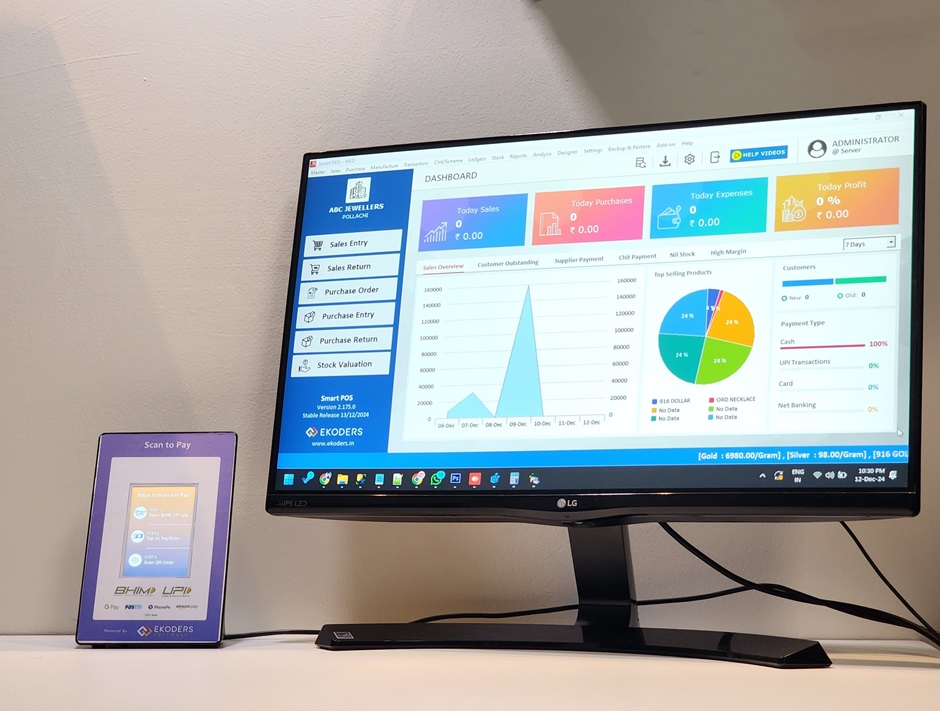
- Two options for seamless UPI payment experience in Retail
- Receipt & Payment Delete
- Now you can delete the past transactions of Customer Receipt & Supplier Payment.
- In the Transaction History List, press F3 to delete the transaction.
For Jewellery #
- Sales Order – Advance Amount Collection
- Sales -> Sales Order [Press F3 to add advance payment]
- Now you can collect multiple advance amount for an order and get history of the same.
- Also the new print profile for advance receipt has been added.
- Tutorial Video Link : (will be uploaded Soon)
- Chit Overview Screen
- Chit/Scheme -> Chit Overview
- Here you can see the summary of all your customer’s chit accounts with the transaction details.
- Usability Enhancements
- In New Chit Registration, you can directly type the customer name without pressing Enter.
- In Chit Instalment Entry, you can view the chit receipt number for paid instalments.
- Old Purchase Payment
- Before : In Old Purchase transaction, you can do payment to customer by Cash only.
- Now : You can do payment in any mode and it will be reflected in the corresponding Book of ledgers.
- Chit Amount Popup
- When doing sales entry, if the customer has an active chit account, then instalment amount details will be popup.
- New Reports & Additions
- Report -> Chit Report -> Chit Payment Pending Report [Added]
- Sales Date wise detailed Report 1 & 2 -> Customer GST added if they had.
BUGS FIXED # #
- Jewellery : In Closing Stock Summary Report, the closing gross weight is wrong for past date reports. This issue has been fixed now.


